Redirecting to Another Page or URL
Check the ‘Does this page redirect...’ checkbox if you want your Content page to redirect to another URL or to a different page in your website. The Enter redirect URL text box will display:
To redirect to a separate URL, enter the url, such as
http://www.yahoo.com.To redirect to another page in your website, enter the url to that page here.
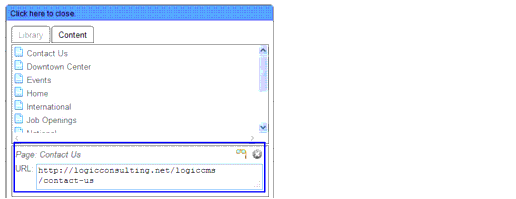
If you are unsure of the page URL, click the Explore Library icon
. On the Content tab, select the Page you want to redirect to and the URL for that page will display at the bottom of the window. Copy that URL and paste it into the Redirect URL field.
If you want the redirect URL to open in a separate browser, check the ‘Open in new window’ checkbox.
If your page redirects to another URL, there are no additional properties to define. You just need to preview and save your content page as described in "Previewing and Saving your Content".
|
Valence, L.L.C. 610 S. Peters Street New Orleans, LA 70130 http://www.valencellc.com http://facebook.com/WeAreValence Phone: (504) 214-1886 |